

Admin Thumbnails
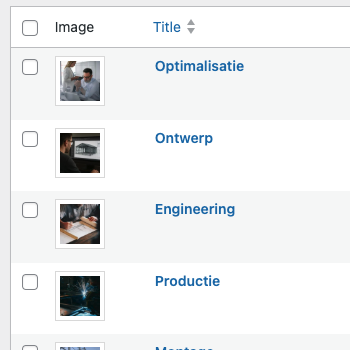
This guide provides a reusable PHP snippet to enhance the WordPress admin experience by displaying featured images as thumbnails in list tables. This is particularly useful for post types like ‘Projects’ or ‘Services’ where a visual reference helps content managers identify items more efficiently.
We’ll walk through adding the PHP class, applying some simple styling with SCSS, and customizing it for different post types and taxonomies.
Our Blocksy child theme is configured to automatically include all PHP files from the inc/ directory. This makes adding new server-side functionality straightforward.
-
Add the PHP Code
Section titled “Add the PHP Code”Create a new file named
AdminThumbnailColumns.phpinside theinc/folder of your Blocksy child theme and add the following code.<?phpnamespace Best4u\BlocksyChild;if (!defined('ABSPATH')) {exit;}/*** Class Admin_Thumbnail_Columns** Adds image thumbnail columns to admin post and taxonomy tables.*/class Admin_Thumbnail_Columns{/*** Post types to display thumbnails for.** @var array*/private array $post_types = ['post', 'page', 'project'];/*** Taxonomies to display thumbnails for.** @var array*/private array $taxonomies = ['category'];/*** Class constructor. Hooks into theme setup.*/public function __construct(){add_action('after_setup_theme', [$this, 'init']);}/*** Initializes thumbnail column registration.** @return void*/public function init(): void{$this->register_post_type_columns();$this->register_taxonomy_columns();}/*** Registers thumbnail columns for post types.** @return void*/private function register_post_type_columns(): void{foreach ($this->post_types as $post_type) {add_filter("manage_{$post_type}_posts_columns", [$this, 'add_post_thumbnail_column']);add_action("manage_{$post_type}_posts_custom_column", [$this, 'display_post_thumbnail_column'], 10, 2);}}/*** Adds a thumbnail column to the admin post list.** @param array $columns* @return array*/public function add_post_thumbnail_column(array $columns): array{$new_columns = [];foreach ($columns as $key => $value) {$new_columns[$key] = $value;if ($key === 'cb') {$new_columns['thumbnail'] = __('Image', 'blocksy-child');}}return $new_columns;}/*** Displays the thumbnail image in the post column.** @param string $column* @param int $post_id* @return void*/public function display_post_thumbnail_column(string $column, int $post_id): void{if ($column === 'thumbnail') {$thumbnail = get_the_post_thumbnail($post_id, [40, 40], ['class' => 'column-thumbnail-image']);echo $thumbnail ?: '<div class="column-thumbnail-image missing"></div>';}}/*** Registers thumbnail columns for taxonomies.** @return void*/private function register_taxonomy_columns(): void{foreach ($this->taxonomies as $taxonomy) {add_filter("manage_edit-{$taxonomy}_columns", [$this, 'add_taxonomy_thumbnail_column']);add_action("manage_{$taxonomy}_custom_column", function ($content, $column_name, $term_id) {$this->display_taxonomy_thumbnail_column($column_name, $term_id);}, 10, 3);}}/*** Adds a thumbnail column to the taxonomy admin list.** @param array $columns* @return array*/public function add_taxonomy_thumbnail_column(array $columns): array{$new_columns = [];foreach ($columns as $key => $value) {$new_columns[$key] = $value;if ($key === 'cb') {$new_columns['thumbnail'] = __('Image', 'blocksy-child');}}return $new_columns;}/*** Displays the thumbnail image in the taxonomy column.** @param string $column_name* @param int $term_id* @return void*/public function display_taxonomy_thumbnail_column(string $column_name, int $term_id): void{if ($column_name !== 'thumbnail') {return;}$term_meta = get_term_meta($term_id, 'blocksy_taxonomy_meta_options', true);$thumb_id = $term_meta['image']['attachment_id'] ?? null;$image = $thumb_id ? wp_get_attachment_image($thumb_id, [40, 40], false, ['class' => 'column-thumbnail-image']) : null;echo $image ?: '<div class="column-thumbnail-image missing"></div>';}}new Admin_Thumbnail_Columns();Once you save this file, the thumbnail column will automatically appear for the specified post types and taxonomies.
-
Add SCSS for Styling
Section titled “Add SCSS for Styling”To ensure the thumbnails look good, add the following SCSS to your theme’s
/assets/src/css/backend.scssfile. This will style the thumbnail and provide a placeholder for items without a featured image. You can modify it as you see fit..wp-list-table {.column-thumbnail {width: 80px;.column-thumbnail-image {height: 40px;width: 40px;object-fit: cover;background: #fff;padding: 4px;border: 1px solid var(--optionBorderColor);&.missing {display: flex;align-items: center;justify-content: center;line-height: 1;&::before {content: url('data:image/svg+xml,<svg xmlns="http://www.w3.org/2000/svg" height="24px" viewBox="0 -960 960 960" width="24px" fill="%235f6368"><path d="m880-195-80-80v-405H638l-73-80H395l-38 42-57-57 60-65h240l74 80h126q33 0 56.5 23.5T880-680v485Zm-720 75q-33 0-56.5-23.5T80-200v-480q0-33 23.5-56.5T160-760h41l80 80H160v480h601l80 80H160Zm466-215q-25 34-62.5 54.5T480-260q-75 0-127.5-52.5T300-440q0-46 20.5-83.5T375-586l58 58q-24 13-38.5 36T380-440q0 42 29 71t71 29q29 0 52-14.5t36-38.5l58 58Zm-18-233q25 24 38.5 57t13.5 71v12q0 6-1 12L456-619q6-1 12-1h12q38 0 71 13.5t57 38.5ZM819-28 27-820l57-57L876-85l-57 57ZM407-440Zm171-57Z"/></svg>');opacity: 0.25;}}}}}
Customization
Section titled “Customization”To change the targeted post types, simply edit the $post_types array at the top of the AdminThumbnailColumns.php file. For example, to add thumbnails to a custom post type called portfolio, you would modify the array like this:
private array $post_types = ['post', 'page', 'project', 'portfolio'];Similarly, you can add other custom taxonomies to the $taxonomies array.